


March 2026 brought a major shift in AI productivity tools, with leading platforms moving beyond simple chat and content generation toward reasoning, automation, agentic workflows, and direct work inside everyday applications
Updates in March focused on three platforms switching from “AI assistant” to “AI agent.” Instead of creating Gemini as a stand-alone software, Google made it a default layer across Workspace. In the meantime, Microsoft added Copilot Agent Mode to Word, PowerPoint, and Excel, enabling Copilot to make multi-step adjustments rather than one-shot drafts. Additionally, enterprise Copilot deployments started providing model selection within the same chat interface, allowing a task to be sent to the model that performs the best, such as OpenAI’s and Anthropic’s Claude.
How Does Word and Excel’s Copilot Agent Mode Operate? (An explanation of the agent loop)
Every platform uses a variation of the same pattern behind the new features. A planner divides a request into phases. Before producing output, a memory or grounding layer gathers pertinent context. This is similar to the retrieval-augmented generation pattern, but instead of addressing open-domain questions, it applies to office documents.
- The planner deciphers the request, such as “schedule a meeting and draft the agenda.”
- Tool-use loop: chooses the spreadsheet, document, or calendar API required for each step
- Grounding/memory: extracts context from previous files, conversations, and emails
- The output layer provides a drafted artifact rather than just words.
Architect’s Note: The real limitation is typically grounding quality rather than model size.
Google Workspace: Does a Google Workspace subscription include Gemini?
Indeed, as of March 2026, Gemini is integrated into Docs, Sheets, Slides, and Drive for AI Ultra and Pro subscribers instead of existing in a different panel. For structured data processing, Gemini in Sheets achieved a new performance level. Because of this, Gemini may now combine data from a user’s files, email, and the public internet while maintaining scoped and tracked data access.
Were You Aware? In the same month, Google also redesigned Maps around Ask Maps, a conversational query layer. This demonstrates how the same agent-plus-memory paradigm is spreading into consumer-facing applications well beyond document editing.
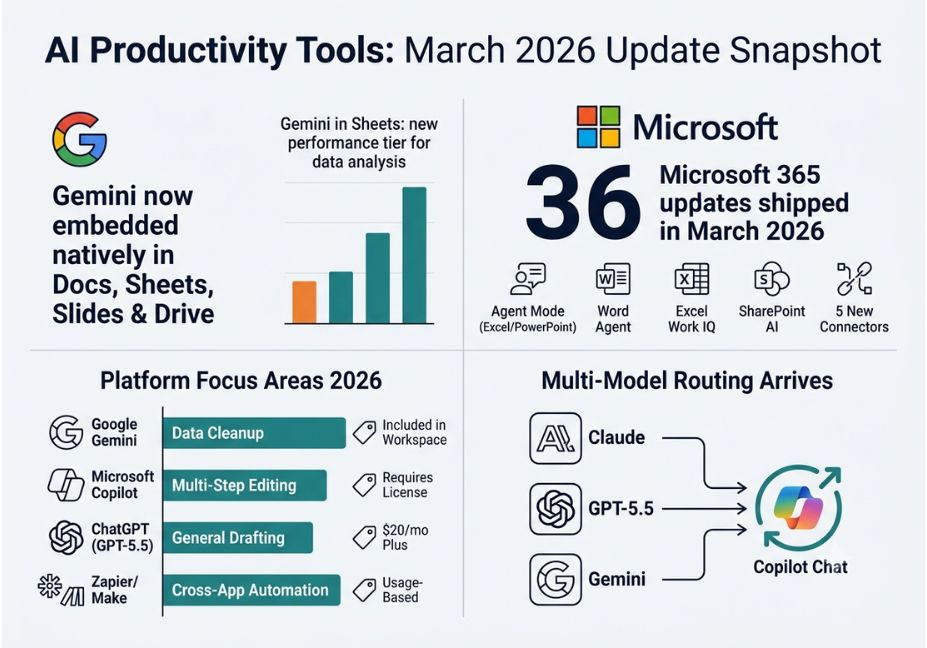
Microsoft 365 Copilot: 36 Updates and a Working Agent Mode
- Edit with Copilot (Agent Mode) pushed out to Excel and PowerPoint for all licensed users, enabling multi-step modifications instead of single responses.
- Word Agent handles research, organization, and formatting while creating long-form works, like policy papers and strategic plans, straight from a prompt.
- Before performing a multi-step edit, Excel Work IQ automatically gathers context from emails, meetings, and conversations.
- Based on the previous Knowledge Agent, SharePoint AI enables teams to create websites and libraries with natural language.
- The version included Microsoft Purview governance changes for enterprise teams, five new Copilot Connectors, and admin-side branding controls.
Use Cases for AI Productivity Tools: Five Actual Examples
- Copilot’s Excel Work IQ is used by finance teams to automatically reconcile a report with context taken from relevant emails and meeting notes.
- Gemini in Sheets is used by marketing teams to clean and analyze campaign data without the need for manual pivot tables.
- Instead of starting from zero, operations leads utilize Word Agent to create a first draft of a compliance policy, which they subsequently amend.
- Support teams can route a client email into a task and a confirmation reply thru a single workflow by using automation services such as Zapier.
How Do You Implement These Updates Without Tool Overload, Step-by-Step?
Next, instead of attempting to automate everything at once, choose one workflow bottleneck, such as scheduling, document drafting, or data cleansing. Then, before adding a third-party automation layer, activate the native agent feature, such as Agent Mode or Gemini in Sheets. Next, see if the output is truly usable by providing the tool a genuine document or dataset from your own context rather than a generic request to test grounding quality.
What Teams and Developers Are Saying
The dependability of the tool-use loop—that is, whether an agent correctly determines which app to call and whether grounding truly pulls the necessary context—has received more attention in development communities than sheer model capacity.


